Ordering Name Cards for Multiple Staff and Departments
One shared design, many individual details. Build a clear name list, organise proofs and plan delivery without losing track of the people behind the order.
Start with one order coordinator
A team order usually becomes difficult because information arrives in different places. One colleague sends a new title by email, another corrects a phone number in a message, and a manager approves an older PDF. Assign one person to maintain the current list and collect the final decisions.
The coordinator does not need to make every design decision. Their role is to keep one agreed set of names, quantities, artwork and delivery details. Department contacts can review their own people, while the coordinator brings those responses together before the order moves forward.
Build a name list that is ready to use
Use a spreadsheet with one row per person. Keep printed information separate from ordering information so a delivery note cannot accidentally become part of the card design.
- Printed information: name, job title, department if required, telephone, email, website and any approved secondary language.
- Order information: quantity, design version, front-and-back file or PDF page range, department reviewer and approval status.
- Delivery information: receiving department, recipient and destination where these differ across the order.
Check capitalisation, qualifications, telephone formatting and official department names before artwork is prepared. Decide which details are standard across the organisation and which genuinely vary. Avoid collecting additional personal information that is not needed for the card or delivery.
A fictional example might list Alex Tan, Sales, 100 cards, proof pages 1–2; Jamie Lim, Operations, 200 cards, pages 3–4; and Sam Lee, Finance, 100 cards, pages 5–6. The important part is the clear connection between each name, its quantity and its artwork.
Agree the common design before creating every name
Approve the company layout first: logo position, fonts, colours, contact format, card size, paper and finish. Include a long name and a long job title in the layout review. A template that works for the shortest name may need adjustment before it can serve the whole team.
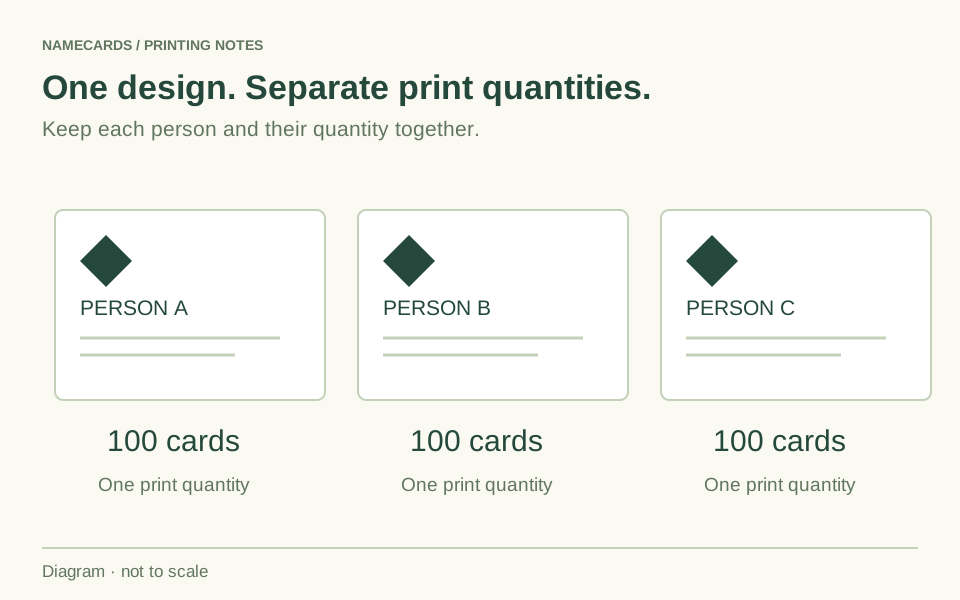
Names sharing the same layout count as one design, but each person's printed quantity is priced separately. Do not split a consistent identity into unnecessary design purchases, and do not assume that combining names creates one larger printing run. Those are different parts of the order.
At Namecards.com.sg, changing only the printed name in an established design costs $5 per changed name. If job titles, phone numbers or other content also change, choose the appropriate artwork service or ask us to confirm the scope. Separate, fully print-ready files for every person use the $0 artwork option.
Calculate quantities person by person
Base quantities on use. A colleague attending regular events may need more cards than someone who primarily works with an established client list. Check whether any roles, telephone numbers or office details are likely to change before ordering a large reserve.
For example, three names with 100 Standard 260gsm cards each, printed on both sides, cost $75 for printing at the prices checked on 18 November 2026. That is three lots of $25. The $69 price for 300 cards applies to 300 copies for one name. Artwork, finishing and delivery are additional where applicable.
Use the staff list to check the total before payment or purchase-order approval. Keep any quotation reference with the list, especially where departments need different papers or finishing. Shared foil or embossing artwork follows the relevant finishing rules; the printing quantity still belongs to each individual name.
Choose a file structure that is easy to check
Either separate files or a clearly organised multi-page PDF can work. Choose the format your reviewers can follow accurately, then use it consistently.
For separate files, use a simple naming pattern such as Sales_Alex-Tan_Front_v03.pdf and Sales_Alex-Tan_Back_v03.pdf. For one PDF, list the page numbers for each person and keep the front-and-back sequence consistent. The filenames and page map are for organisation; they do not replace the quantities in the order.
Send the latest files together with the matching list. Avoid a mixture of screenshots, older exports and files labelled only “final” or “final-new”. If one person's details change, identify the replacement explicitly and check the resulting proof before approval. Our artwork guide covers the technical requirements for the final print PDF.
Review the proof in two passes
First, ask each department to check its people: spelling, title, telephone, email, language and quantity. Then let the coordinator check the full set: consistent logo treatment, correct front-and-back pairing, repeated company details and missing names.
Use one consolidated correction list. Identify the person and the exact change, rather than saying “please use the details from the earlier email”. If there is a revised proof, everyone should review that version. An approval of an earlier file does not resolve changes made afterwards.
Before giving final approval, test QR destinations and check the visible information at the intended card size. Keep the approved proof and staff list together. Production begins after artwork approval and the applicable payment, confirmed purchase order where required, or agreed credit arrangement.
Plan the handover to each department
For paper cards going in the same delivery, quantities across names can count towards the five-box free-delivery threshold in eligible areas. One box is 100 cards. Tuas, Tuas South and Restricted Area remain chargeable. Tell us if the order needs multiple destinations, separate department packing or a particular receiving arrangement so these requirements can be confirmed.
Provide the recipient's name, delivery address, contact number and any building access or receiving-hour instructions. A company name alone may not help a courier find the correct reception or loading point. Keep this receiving information separate from what is printed on the cards.
When the cards arrive, reconcile the names and quantities against the approved list before distributing them. Store one current specification record for the next new starter, rather than asking the next coordinator to reconstruct the order from several inboxes.
A few useful answers
Can different staff order different quantities?
Yes. Record the quantity for each person and use the available quantity options for the chosen product. Printing is priced separately for each name.
Should I send one PDF or separate files?
Both can be practical. Use clear filenames for separate files, or a page map for a multi-page PDF, so every front, back and quantity can be matched to the correct person.
Does one company design mean one printing price?
No. A shared layout can avoid unnecessary design work, but each name's printing quantity is still priced separately. Special finishing has its own grouping rules.
Can different departments receive separate deliveries?
Include each destination and receiving requirement in your enquiry so the delivery arrangements and charges can be confirmed. Do not assume the single-destination free-delivery rule covers several addresses.